


Reasons to come back
A reward to look forward to can encourage customers to return. Looking after people who already know you complements attracting new customers.
Build repeat visits with digital stamp cards, QR codes and rewards. For coffee, set lunches, haircuts and many more reasons to return.
Bringing someone into your business is just the beginning. Promotoro helps you give them a clear reason to return: a reward within reach, credit to enjoy and a card that carries your brand.
Explore both promotion typesCustomers discover your business and take their digital card with them.
Stamps or credit show them what they have already earned.
A reward gives them a reason to choose you again.
Your service makes the experience worthwhile. Promotoro helps keep it going.
A reward to look forward to can encourage customers to return. Looking after people who already know you complements attracting new customers.
With stamps, each qualifying visit or purchase brings customers closer to a clear goal. They know their progress and the reward waiting when their card is complete.
Part of what customers pay becomes credit to spend at your business. They can collect and redeem it whenever they want, always keeping the same card.
Choose stamps or cashback to suit your business, set the reward or percentage and review activity. Your team manages redemptions from the same dashboard.
An illustrative example using a percentage chosen by the business. Cashback is credit to redeem, not a deposit into the customer’s bank account.
Promotoro connects the customer experience with clear business management.
Customers always have their promotions on their phones, with nothing to lose or forget.
Scan, review the customer and add one or more stamps from any phone.
Your business logo, colours, images and name in the app, installed shortcut and cards.
Create clear rewards and turn a first purchase into the start of a relationship.
One card and one QR, ready for Apple Wallet and Google Wallet.
Customers, promotions, progress, rewards and activity in a simple manager.
Coffee, set lunches, haircuts or regular services: choose what to reward and discover how to organise your promotion.
These screens were generated directly from the Promotoro manager and customer app with EgoHouse branding.
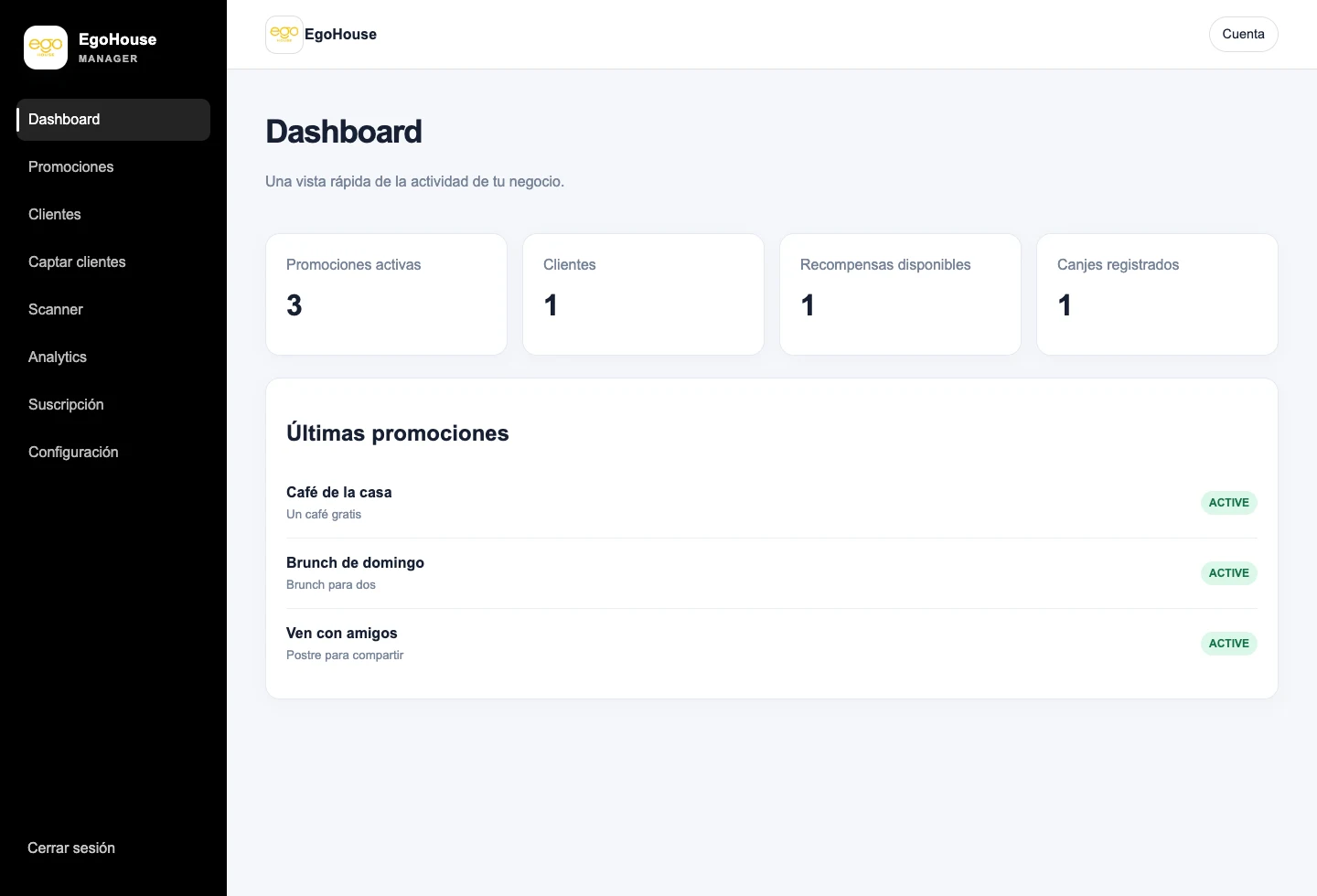
Active promotions, customers, rewards and redemptions at a glance, with your business branding.
A walkthrough of the tools used by your team.
See the experience installed on a customer’s phone.
Real Promotoro interface. The customer names, metrics and activity shown are demonstration data and do not represent real people. Videos and screenshots show the Spanish interface. The app is also available in English.
Designed so anyone on your team can use it from day one.
Choose stamps or cashback and customise your promotion.
Share your registration QR in store or on social media.
Scan the QR to add stamps or record a cashback purchase.
 Your next reward
Your business can run both types of promotion. Each has its own card and conditions.
Set how many stamps customers need and the reward they receive when they complete their card.
Set the percentage of the amount paid that returns to the card as credit to spend at your business.
Alongside stamp cards, create promotions that return a percentage of each purchase as credit to spend at your business. You choose the percentage; Promotoro does the maths.
How it works in PromotoroCustomers collect credit to redeem at your business. It is not a refund to their bank account.
Choose Cashback when creating a promotion and set how much customers earn on each purchase. Stamp promotions remain available.
 Open full screenshot ↗
Scan the customer’s QR, enter the amount paid and confirm. Cashback is calculated and automatically added to their card.
 Open full screenshot ↗
Customers can request redemption whenever they have credit. Your team confirms full redemption: the balance returns to zero and the same card is ready to keep earning.
 Open full screenshot ↗
Screenshots of the actual interface in a local environment with fictional data. They show separate stages of the flow, not one single purchase. Screenshots show the Spanish interface; the app is also available in English.
From the customer profile, authorised staff can add or subtract credit with a reason. Every purchase, adjustment and redemption is recorded.
The card displays credit and percentage and keeps its identity after each redemption. Customers can also view it in the app or on the web.
When you publish a promotion, customers who already have a card from your business get an in-app/web notice. Wallet notifications are also attempted when available and permitted by the device.
Each promotion has its own type and its own card.
Coffees, set meals, breakfasts or visits that lead to a simple, clear reward.
Reward repeat visits without complicating bookings, payments or customer service.
Turn repeat purchases and visits into a recognisable relationship with your brand.
Your business Card DEMO0001Your business
Every visit earns a reward
Card DEMO0001Illustrative previews · Final appearance may vary by device.
Browser access, app installation and support for Apple Wallet and Google Wallet. Progress stays synchronised with the same QR.
Subscribe and set up your first promotion with Promotoro.
It is a card customers view on their phones to see stamps and rewards. The business defines which purchase or visit counts, how many stamps are needed and what customers earn when they reach the goal.
Customers show their promotion QR. Staff scan it, review the transaction and confirm the stamps. Cards and adjustments can also be managed from the customer profile in the dashboard.
They can start in their phone browser. Installable access and Apple Wallet and Google Wallet options are also available, subject to each integration’s availability and configuration.
Yes. Personalise your business identity and promotion designs. The customer app displays the branding, progress and rewards defined by the business.
The plan costs €29.90 per month plus VAT and includes the dashboard, promotions, cards, QR scanner and customer app. The subscription renews monthly and you can cancel the next renewal from the dashboard.
Choose a reward your margins can support and customers can understand. Publish the goal, eligible products or services and redemption terms. Examples are configuration ideas, not commercial offers or guarantees of results.


